
 EN (€EUR)
 Support
  Contact
  My Quote


 Sign in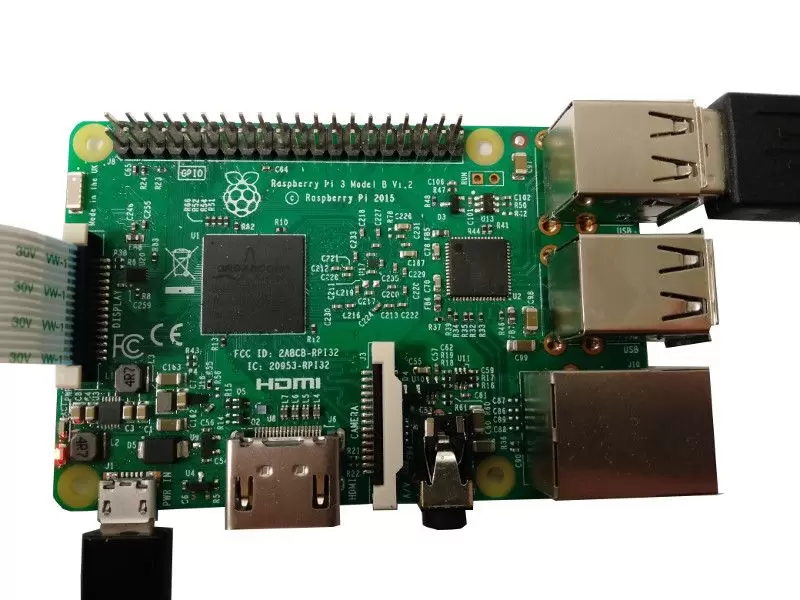

You want to learn robotics with Raspberry Pi and make your robot smarter? Raspberry Pi boards and robots are a natural match: a Raspberry Pi is a small, affordable computer that can power anything from IoT projects to web servers, and many accessible robots now embed one.
In this guide, we’ll show you what a Raspberry Pi is, what you will learn with it, which board to choose, and what you need to do to actually get started: installing an operating system, programming, using the GPIO pins, adding a camera and connecting an Arduino board.
Ready? Let’s go:
What is a Raspberry Pi
Raspberry Pi is a project developed by the Raspberry Pi Foundation to bring accessible computers and technology education to anyone in the world. Since the first board in 2012, the range has grown to include the Raspberry Pi 5, the Raspberry Pi 4, the Raspberry Pi 3 and the tiny Raspberry Pi Zero 2 W, with different configurations and prices.
What you’ll find on a Raspberry Pi board:
- Processor
- RAM
- USB ports
- HDMI port(s)
- Ethernet port (not on the Zero)
- Wi-Fi and Bluetooth (on recent boards)
- Camera interface
- GPIO pins
- microSD card reader
As you can see, nothing too different from a real computer. In fact, a Raspberry Pi is a real computer that fits on a credit card-sized board. On top of that, its ports and pins let you connect many devices and hardware components. Impressive, right?
What will you learn with a Raspberry Pi
Before you start learning robotics with Raspberry Pi, it’s better to know exactly what you will learn when using this board.
Robotics is mostly about 3 skills: mechanics, electronics and computer science. With Raspberry Pi, you will mostly learn computer science and communication protocols for dealing with external electronic devices such as sensors and motors.
You will also learn about system administration and networking, as you will need to configure part of your operating system and communicate with other boards or Internet services.
Finally, you will extend your knowledge of electronics. If you want to receive data from a sensor (for example to know the inclination of your robot), you will learn how to use communication protocols, how to plug the wires in the right place and how to read a component datasheet. Reading a datasheet is hard at the beginning, but once you manage to understand one, you can almost understand all of them, as they often follow similar patterns.
After all that, if you want to go further, you can add a microcontroller board (like Arduino) that you will use along with your Raspberry Pi to handle more “low-level” tasks on your hardware. You will get to learn different aspects of robotics.
What you can do, and what you can’t do with a Raspberry Pi
Let’s look at the benefits and the limitations of using a Raspberry Pi.
As a Raspberry Pi is a real computer, you can do some heavy computation and run real software developed by you or by the community. You are not limited to basic programs (like blinking LEDs or controlling a motor): you can put more intelligence in your robot.
Raspberry Pi comes with an operating system made for beginners, along with easy and detailed instructions. You don’t need to worry about the setup: you can directly learn robotics with Raspberry Pi by following online tutorials and experimenting on your own.
You will also find plenty of ports and pins for network communication and hardware control, and recent boards have Wi-Fi and Bluetooth natively integrated. Combined with the credit-card size, it is very easy to embed a board in your robot.
Whether you are a total beginner or an advanced user, you will always find a way to control your robot using a Raspberry Pi. A great way to learn robotics!
The main limitation is that, even if it is a computer, it is less powerful than a recent laptop. You can run almost everything you need for your robot, but don’t expect to run heavy graphical programs like CAD software. That is not a red flag for your project, because you don’t generally buy a Raspberry Pi for this purpose.
Another, more complex limitation appears when you need to deal with real-time constraints. We cover this point below, in the Arduino section.
Which Raspberry Pi to choose for robotics
Each generation takes the best of the previous one, with more powerful components and new features. For a new robotics project, we recommend starting with a Raspberry Pi 4 or a Raspberry Pi 5: they are far more powerful than the older boards and have Wi-Fi and Bluetooth natively integrated, so all you need to get started is a keyboard, a mouse and a screen. The Raspberry Pi 5 is the most powerful of the range but needs a more powerful power supply (5V/5A). The Raspberry Pi 3 Model B+ is still in production and remains a good option for lighter projects, and the Raspberry Pi Zero 2 W is ideal when your robot has to stay very small.
The older Raspberry Pi 1 and Raspberry Pi 2 are no longer worth buying for a new project.
Here is how the current boards compare:
| Board | Processor | RAM | Wireless | Best for |
|---|---|---|---|---|
| Raspberry Pi 5 | Quad-core Arm Cortex-A76, 2.4 GHz | 1 to 16 GB | Dual-band Wi-Fi, Bluetooth 5.0 | Demanding projects: computer vision, AI, advanced robots |
| Raspberry Pi 4 Model B | Quad-core Arm Cortex-A72 | 1 to 8 GB | Dual-band Wi-Fi, Bluetooth 5.0 | Most robotics projects, a very well-documented board |
| Raspberry Pi 3 Model B+ | Quad-core Arm Cortex-A53, 1.4 GHz | 1 GB | Dual-band Wi-Fi, Bluetooth 4.2 | Lighter projects and learning the basics |
| Raspberry Pi Zero 2 W | Quad-core Arm Cortex-A53, 1 GHz | 512 MB | 2.4 GHz Wi-Fi, Bluetooth 4.2 | Very small robots and low-power projects |
Not sure where to start? Our guide to the Raspberry Pi 4 for robotics and STEM goes into more detail about that board.
Installing an operating system on Raspberry Pi
First of all, you need a microSD card. Even if you can install almost any OS with just an 8 GB card, we recommend a 16 GB or 32 GB one. Also, check that your microSD card is class 10 or A1/A2 rated for good speed.
Installing an operating system on an SD card is straightforward. The official Raspberry Pi Imager downloads the OS you choose and writes it to the card for you in a few clicks. The Raspberry Pi website also provides a great getting started guide. You can also buy an SD card with a pre-installed image, but we recommend doing it yourself while following the tutorial, as it is easy and you will learn some basics.
Now, which OS (operating system) to install? Raspberry Pi OS is the OS made for Raspberry Pi boards. It is better to start with that, as you are sure that most features will be supported and the hardware will work nicely out of the box. You can pick it directly in Raspberry Pi Imager.
If you like Ubuntu (like us), you will be happy to know that Ubuntu publishes official images for Raspberry Pi, desktop and server versions included.
More advanced users can also find lightweight OS versions with no graphical interface. They speed up your applications significantly.
Programming on Raspberry Pi
Raspberry Pi is a great platform to learn robotics, and at some point you will need to program your robot: controlling motors, reading data from sensors, or creating a server program to control your robot from a web interface.
The good news is that Raspberry Pi OS and most operating systems already come with a Python development environment. Python is a good language to start programming and is often adopted by beginners. More than a language for learning, Python is widely used in real applications and allows fast prototyping and development.
You will also find many open-source Python libraries to help you interact with the pins and ports of your Raspberry Pi board. That way, you can create useful stuff for your robot without too much struggle.
Of course, you can use any language you want (C, C++, Ruby, JavaScript…), depending on the application you are building. For robotics projects, Python and C++ are the most used. Combined, they allow fast development and optimized code for better performance.
Use GPIO pins

After you have installed an OS and learned some basic programming, you can start using the GPIO pins of the Raspberry Pi board. They allow you to connect your board to hardware components, through I2C and SPI protocols for example.
Some libraries let you use those communication protocols easily without knowing how they work under the hood. For example, smbus2 is a Python library that makes I2C communication very easy.
From the 40-pin header of the Raspberry Pi (Raspberry Pi 2 and later, including the Pi 4 and Pi 5) you will be able to:
- Control the inclination of your robot with an IMU sensor (Inertial Measurement Unit)
- Control the position of your robot with a laser detector
- Get environment info such as temperature, pressure…
- Communicate with another computer board or a microcontroller board (e.g. Arduino)
Embed a camera
Raspberry Pi has a camera interface, and you can buy a camera specially made for Raspberry Pi, which is low cost, easy to connect and provides good image quality.
Imagine all the possibilities! You could build your own drone and use the camera to process images from the environment, so your drone knows where to land and how to avoid obstacles.
If you want to use a camera on your Raspberry Pi board, have a look at the OpenCV library. You can use this open-source library to process images from your camera and recognize parts of the environment, faces, etc.
Communicate with an Arduino board
What’s great with Raspberry Pi is that you can connect it to almost anything. Imagine a Raspberry Pi + Arduino combination… That’s possible, and it’s a very good idea for robotics applications.
But when do you need an Arduino board with your Raspberry Pi board?
- Sometimes you have real-time constraints that the OS on your Raspberry Pi can’t handle well. In this case you can use an Arduino board for the real-time tasks and connect the two boards, so the Raspberry Pi still performs the heavy computation and lets the Arduino do the lower-level jobs.
- If you need to control a lot of motors, let’s say 5 stepper motors, you will need to add a board to your Raspberry Pi to handle power supply and motor control (sometimes with real-time constraints). An Arduino Mega with a RAMPS 1.4 shield can do that perfectly!
- If you want to control multiple pieces of hardware in your home with only one command center, you can connect multiple Arduino boards to one Raspberry Pi board.
Connect your robot to your home
With an Ethernet connection, you can directly plug your Raspberry Pi into your home router, and here you go! You just got a small, low-cost server just for you.
With Wi-Fi and Bluetooth, you can have your Raspberry Pi embedded in your robot and still communicating with the outside. That way, you can imagine creating a server on your robot, so you can control it from a mobile application, or from a remote position on the other side of the world.
Let’s take the example of the drone again. While processing images with OpenCV, you could also stream the video to your computer, so you can see what the robot sees.
Real use case: Niryo Ned2
After all those points, you might want an example of a real robotics project using a Raspberry Pi board.
At Niryo, we use a Raspberry Pi board to control our robot, Ned2 – Educational Robotic Arm. We made this choice because we wanted the robot to be more capable and open. We also embedded the Ubuntu operating system so we can run Robot Operating System (ROS), a great set of tools for powerful robotics applications.
Frequently asked questions
Which Raspberry Pi is best for robotics?
For most robotics projects, a Raspberry Pi 4 or a Raspberry Pi 5 is the best choice: they are powerful enough for computer vision and ROS, and they have Wi-Fi and Bluetooth built in. Choose the Raspberry Pi Zero 2 W only if your robot has to be very small.
Can a Raspberry Pi control motors directly?
Not directly. The GPIO pins work at low voltage and low current, so they can’t power motors themselves. You need a motor driver, a motor HAT or a board like an Arduino between the Raspberry Pi and the motors, plus a separate power supply for the motors.
Raspberry Pi or Arduino for a robot?
They do different jobs. A Raspberry Pi is a full computer, ideal for programming, vision, networking and high-level decisions. An Arduino is a microcontroller, better for real-time control of motors and sensors. Many robots combine both.
Which programming language should I use?
Python is the best way to start: it comes with Raspberry Pi OS, has many libraries for GPIO, sensors and cameras, and is widely used in robotics. C++ is a good complement when you need more performance.
Your turn!
We gave you here an introduction on how to learn robotics with Raspberry Pi. With all these points, you can see what you can do and how to find the right information to make progress at the beginning.
We strongly encourage you to take part in the community around Raspberry Pi, such as the official forums, or other websites providing great tutorials. After you build your robot, you can share your work with the community and get feedback and positive comments, everything you need to keep motivating yourself.
Now, it’s your turn to learn robotics with Raspberry Pi!


